WalletPasses | Passbook Wallet
- 4.5
- Rating
- 10.00M
- Installs
- Free
- Price

 Analysis by App-foxy
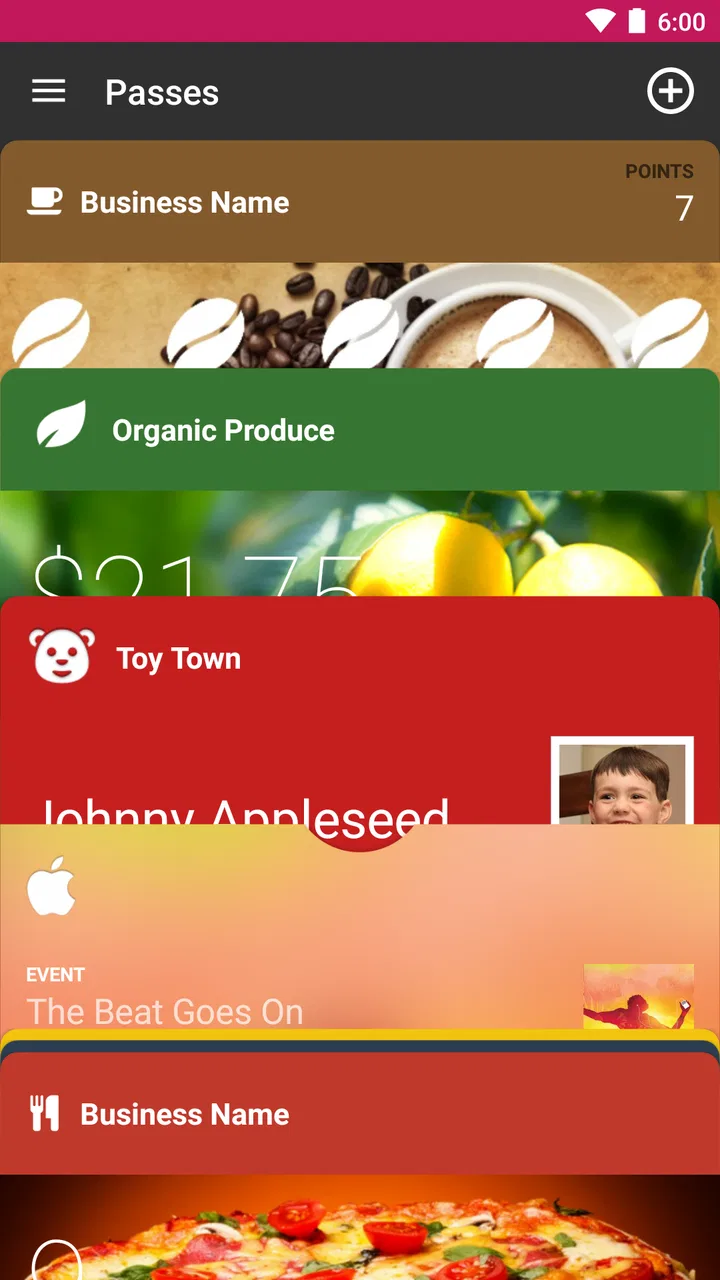
I found WalletPasses | Passbook Wallet most useful when I wanted one practical place for digital passes instead of searching through email, screenshots, and separate travel apps. It is a free Travel & Local app from Wallet Passes Alliance, designed around the simple idea of keeping compatible passes organized on an Android phone. That focus makes it easier to understand than a broad travel planner, although it also means its value depends heavily on the kinds of passes you actually use.
My overall impression is that this is a straightforward utility rather than an app I would open for entertainment or trip inspiration. I would recommend it to someone who regularly receives boarding passes, tickets, membership cards, or similar digital documents and wants a dedicated wallet-like space. I would be more cautious with it for someone who already has a preferred wallet service or whose passes are mostly tied to individual airline, event, or retailer apps.
How WalletPasses fits into everyday travel
The app belongs to the Travel & Local category, but it does not try to replace a booking service, map, itinerary manager, or airline application. Its role is narrower: gather passes so they are easier to find when you need them. That distinction matters. If you expect restaurant suggestions, route planning, reservation management, or live travel updates, this is not the right tool. If your problem is digital clutter, its focused approach makes much more sense.
You May Also Like

 Blood Strike: 2.5 Anniversary
Blood Strike’s Loadouts Turn Every Drop Into a Tactical Gamble
A close look at Blood Strike’s custom loadouts: how fast access to signature weapons reshapes its battle royale rhythm, rewards preparation, and narrows the gap between fights.

 Pandora - Music & Podcasts
Pandora’s Music Is Easy to Start, but Harder to Recover
Pandora’s strength is its low-effort path from a seed to a station. Its weak spot is how much confidence it asks you to place in connection, setup, and quiet recovery.

 8 Ball Pool
 Is Built on Rivalries, Rematches, and Routine
A close look at the rivalries, rematches, shared routines, and unanswered safety questions that turn a quick pool match into a persistent mobile community.

 Samsung Music
’s Quiet Strength Is Playing What You Already Own
Its reach comes less from spectacle than from dependable access to a personal library. That simplicity is both the app’s strongest retention engine and its ceiling.

 AccuWeather: Weather Radar
AccuWeather Review: A Quick, Clear Forecast for Everyday Decisions
For everyday plans, the best forecast is the one you can understand quickly. AccuWeather makes rain timing, radar, and local conditions easy to act on, with a few trade-offs.

 Hill Climb Racing
Why Hill Climb Racing Still Turns Crashes Into One More Run
A tiny car, a bumpy hill and one more upgrade: Hill Climb Racing keeps resurfacing because its simple chaos makes every near-miss feel personal.
More From Our News Desk
View All News


In daily use, I would treat it as the final step after buying a ticket or receiving a membership card. Instead of leaving the pass buried in an inbox, I can place it in the wallet and return to it later. That workflow is especially handy before leaving home, when I want to check that the relevant pass is ready without opening several unrelated apps.
A realistic example is a weekend trip. I might receive a travel pass by email, save it in the wallet, and then keep a hotel-related confirmation in my usual email app because not every travel document belongs in the same format. At the airport or station, I would use the wallet for the pass itself and keep the booking message available for details that the pass does not contain. The useful habit is to see WalletPasses as a pass organizer, not as a complete travel command center.
What feels quick and what affects the experience
I found the basic concept easy to approach because there are fewer layers than in a full travel platform. The app is not asking me to build an itinerary or configure a complicated trip. I can think of it as a small, purpose-built drawer: open it when I need a pass, choose the relevant item, and move on.
That simplicity creates a reasonable expectation of quick access, but the actual experience can still depend on the phone, the pass source, and the way the pass was received. A lightweight-looking wallet does not automatically make every import instant. A pass may arrive through another service, an email attachment, or a file, and the steps before it appears in the wallet can vary. I would judge the app most favorably when it is already prepared with the passes I need, rather than when I am trying to organize everything minutes before departure.
For that reason, I recommend adding important passes ahead of time. This is more than a convenience tip: it separates the organization task from the stressful moment when a ticket is being checked. I also prefer keeping a backup route to the original email or ticket source until I have opened the pass successfully inside the wallet. That small precaution avoids turning a last-minute import problem into a travel problem.
Handling a busy collection of passes
The app becomes more valuable as the number of passes grows, but heavy use also exposes the limits of any simple wallet. A few active passes are easy to understand. A large mixture of old event tickets, expired travel documents, loyalty cards, and duplicate files can become less tidy unless I regularly remove or review items.
My practical approach would be to clean the wallet after a trip or event rather than allowing every old pass to remain indefinitely. Keeping only current and recurring cards makes the important items easier to spot. It also reduces the chance of selecting the wrong ticket when several look similar. This is one of the less obvious trade-offs: a digital wallet saves time only when I maintain it, while an unmanaged wallet can recreate the same clutter it was meant to solve.
Another useful workflow is to prepare passes by purpose. Before a trip, I would open the wallet and check transportation passes together, then verify that any recurring membership cards are still present. For a concert or venue visit, I would avoid relying on a screenshot merely because it is familiar; I would first confirm that the actual pass is available in the wallet. This gives me a clearer pre-departure checklist without asking the app to manage the rest of the journey.
People who carry many passes should also think about duplicates. Saving the same ticket from multiple messages may create uncertainty about which version is current. I would keep the newest clearly identifiable copy and retain the original source elsewhere until the event is over. That is a small organizational detail, but it matters more than having a long list of stored cards.
Stability and recovery when something goes wrong
A wallet app earns trust through predictable retrieval. When I am standing at a gate, counter, or entrance, I do not want to spend time wondering where a pass went. WalletPasses is appealing because its purpose is concentrated, but I would still avoid treating any single app as the only copy of an important travel document.
My recovery routine is simple. Before leaving, I open the pass, check that it is the expected one, and keep the original confirmation accessible until the journey or event is complete. If the wallet does not show what I expect, I can return to the source message rather than repeatedly searching inside the app. This is not a criticism unique to this product; it is sensible preparation for any digital ticket system. The important point is that the app works best as a convenient access layer, not as a reason to discard every backup.
When a pass is outdated, duplicated, or associated with a completed trip, I would remove it or separate it mentally from active passes. A clean collection improves recovery because there are fewer possibilities to inspect. I also prefer adding a pass during a calm moment with a stable connection, rather than assuming I can solve every issue at the entrance. The app can make retrieval easier, but it cannot correct an invalid ticket or replace information held by the issuer.
That distinction is particularly important for airline and event users. The wallet may help present the pass, while changes, cancellations, seat updates, or venue instructions may still come from the airline, organizer, or original provider. I would therefore check the source service for changes and use WalletPasses primarily for organized access. Anyone expecting the wallet to become the authoritative booking account may find that division frustrating.
Older phones, storage, and practical device limits
WalletPasses supports Android devices running version 5.0 or later, which gives it a broad compatibility range. That makes it relevant to people who keep an older phone as a travel device or do not upgrade frequently. Still, compatibility is not the same as identical comfort on every handset. A newer phone may feel more responsive when switching between apps, while an older device may make importing, opening, or returning to a pass feel less fluid.
I would be comfortable recommending it for a modest Android phone when the goal is simply pass organization. I would not promise the same experience on every older device, especially if the phone is already short on free storage or running many background apps. Those are general device conditions, but they matter in a situation where quick access is more important than browsing features.
The app is free to install, and its content rating is Everyone, so it is approachable for a wide range of users. The current version is 2.7.1, and the developer is Wallet Passes Alliance. The app has been available since April 3, 2016, which gives it a long presence compared with a newly launched utility. Its scale is also notable: it has passed ten million installs, with an average rating of 4.5 from around 172 thousand ratings and roughly three thousand written reviews.
Those figures suggest that the basic wallet idea works for a substantial audience, but popularity should not be confused with a guarantee that every pass type or personal workflow will feel perfect. I would still test the kinds of passes I use most often before making the app central to my travel routine. A tool can be well established and still be a poor fit for someone whose tickets remain locked inside another provider’s ecosystem.
Where it beats ordinary alternatives
The most obvious alternative is keeping passes in email. Email is flexible and universal, but it is also noisy. A dedicated wallet can reduce the number of searches, especially when I remember the pass but not the sender, subject line, or exact booking date. Screenshots are another common alternative, yet they are easy to mix up and may not reflect a later update. WalletPasses offers a more intentional place for the pass than either of those quick fixes.
Individual airline, transit, retailer, and event apps can be better when I need live account information, booking changes, loyalty activity, or provider-specific support. Their weakness is fragmentation: each service demands its own app and navigation habits. WalletPasses is more attractive when I want a central pass view without opening several brand apps. The trade-off is that the dedicated provider app may offer richer context around the ticket.
Compared with a broad mobile wallet, this app’s appeal is its pass-focused identity. A broader wallet may be preferable if I want payment cards, identity documents, or other financial tools alongside tickets. WalletPasses makes more sense when my priority is organizing passes rather than combining every digital credential in one place. I would choose based on that boundary instead of assuming one wallet must replace all others.
There is also a useful privacy-and-convenience trade-off in relying on a separate pass organizer. I get a focused place for travel-related items, but I add another app to my phone and another step to my routine. Someone who carries only one or two passes per year may find email perfectly adequate. Someone who repeatedly handles tickets and membership cards is more likely to notice the benefit.
Costs, audience, and the point where I would skip it
The app is free, but it includes in-app purchases listed from $0.99 to $99.99 per item. That means I would look carefully at any purchase prompt and decide whether it adds value to my particular use case. For occasional pass storage, I would begin with the free experience and avoid paying simply because I wanted a cleaner travel routine. The presence of optional purchases does not automatically make the app poor value, but it is worth keeping the wallet’s basic purpose in perspective.
I think it is a good match for frequent travelers, commuters who receive compatible digital passes, families organizing several tickets, and anyone tired of searching through a crowded inbox. It can also help a person who uses an older Android phone and wants a dedicated place for passes without moving to a more complex travel platform.
I would skip it if my main need is booking flights, receiving real-time disruption alerts, managing reservations, or storing payment cards. I would also be cautious if nearly every pass I use is tied to a provider app that already gives me fast, reliable access. In that case, adding a separate wallet may create duplication rather than reduce it. The same applies to people who rarely use digital passes: the setup and maintenance may not justify the small convenience.
My performance verdict after looking at the whole workflow
WalletPasses is best understood as a focused organizer that can make pass retrieval calmer and more deliberate. Its performance value is not about demanding graphics or elaborate tools; it is about reducing the steps between opening a wallet and showing the right pass. That benefit is strongest when I prepare items in advance, keep the collection tidy, and remember that the original issuer remains important for changes and support.
I like the app for the gap it fills between messy email searches and a collection of separate provider apps. I also appreciate that it is free to start, rated for Everyone, and compatible with Android 5.0 or later. At the same time, I would not rely on it without a sensible backup for an important trip, and I would not expect it to replace airline, event, payment, or itinerary services.
My recommendation is therefore positive but specific: use it if your daily frustration is finding digital passes, not if your real problem is planning travel. Add important items early, remove expired duplicates, verify the pass before leaving, and keep the issuing service available for updates. With those habits, WalletPasses can be a practical, low-friction part of an Android travel setup. Without them, it risks becoming just another place where old tickets accumulate.
FAQs for WalletPasses | Passbook Wallet
01What is WalletPasses and how does it work?
WalletPasses is a digital wallet application that allows users to store and manage their digital passes, such as boarding passes, event tickets, and loyalty cards, directly on their Android device. The app supports the Passbook format, making it compatible with a wide range of digital passes. Users can easily import passes via email or a direct link, and the app organizes them for quick access.
02Is WalletPasses compatible with all types of digital passes?
WalletPasses is compatible with most digital passes that use the Passbook (.pkpass) format. This includes boarding passes, event tickets, coupons, and loyalty cards from many service providers. However, some proprietary formats may not be supported, so it's important to verify compatibility with each specific pass provider before relying solely on the app.
03Does WalletPasses require an internet connection to function?
WalletPasses does not require an internet connection to access your stored passes once they are downloaded to your device. However, an internet connection is needed to initially download passes into the app, update existing passes, or access any online features provided by the pass issuer, such as real-time updates and notifications.
04How secure is WalletPasses in terms of protecting my information?
WalletPasses takes user security seriously by not storing any personal information on external servers. All data is stored locally on your device, and the app does not require you to create an account. However, it’s important to ensure your device is secure, as anyone with access to your phone can view your passes. Regularly updating the app and your device’s security settings can enhance protection.
05Can I share my passes with others using WalletPasses?
Yes, WalletPasses allows you to share your stored passes with others. You can send passes via email or other sharing options available on your device. This feature is handy for sharing tickets or passes with family and friends. Ensure that the recipient’s device is compatible with the Passbook format to avoid any issues when they try to access the shared pass.
Pros
- Easy to import passes from email or web.
- Supports a wide variety of pass formats.
- Automatic updates for pass changes.
- Simple and intuitive user interface.
- Battery-efficient background operations.
Cons
- Limited customization options.
- Occasional syncing delays.
- Ads in free version can be intrusive.
- No direct integration with all airlines.
- Requires manual pass organization.

WalletPasses | Passbook Wallet
Gallery